
Download No Fuss Bookmarks – Chrome, API, RESTful, Hackers, Developers
Overview
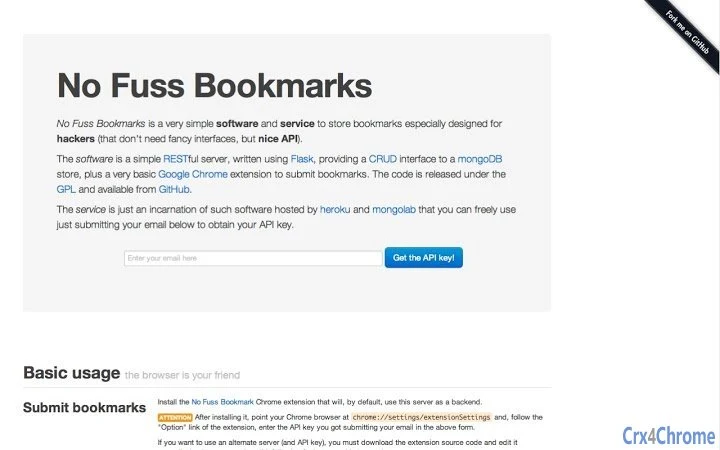
No Fuss Bookmarks is a minimalist desktop software designed to streamline the management of web bookmarks for technical users, particularly developers and hackers who prioritize functionality over aesthetics. Built as a lightweight RESTful server using Flask and backed by MongoDB, the tool offers a straightforward CRUD (Create, Read, Update, Delete) interface for storing and retrieving bookmarks. Its primary purpose is to eliminate the complexity of traditional bookmark managers, providing a clean, no-frills solution for users who value speed, simplicity, and direct access through APIs.
The software is especially suited for individuals working in fast-paced development environments or those who rely on automation and scripting. Real-world usage includes integrating bookmark data into personal knowledge bases, synchronizing resources across multiple devices, or feeding curated links into custom tools and workflows. The developer, No Fuss Bookmarks Team, has made the source code openly available on GitHub under the GPL license, promoting transparency and community-driven improvements. The service is also hosted on Heroku with Mongolab, allowing users to access a free, ready-to-use instance by simply providing an email to receive an API key.
Key Features & Capabilities
- RESTful API Interface – Offers full CRUD operations via standard HTTP methods, enabling seamless integration with scripts, automation tools, and custom applications.
- Flask-Based Server – Built with Python’s Flask framework, ensuring a lightweight and modular backend that’s easy to extend or deploy locally.
- MongoDB Backend – Utilizes a NoSQL database for flexible data storage, allowing efficient handling of unstructured bookmark metadata such as URLs, titles, tags, and timestamps.
- Chrome Extension – A basic browser add-on that allows users to submit bookmarks directly from Google Chrome with minimal interaction.
- Open Source & Free – The entire codebase is available on GitHub under the GPL license, enabling full inspection, modification, and redistribution.
- API Key Access – Users can access the hosted service by registering with an email to obtain a unique API key, simplifying authentication for automated workflows.
These features make No Fuss Bookmarks ideal for developers who need to programmatically manage their bookmarks without relying on bloated desktop applications. For example, a hacker might use the API to automatically save links from a reconnaissance tool into their personal repository, or a developer could script a daily sync of research links into a project documentation system.
User Interface, Workflow & Performance
The user interface of No Fuss Bookmarks is intentionally minimal, focusing on functionality rather than visual polish. As a server-based application, the primary interaction occurs through API endpoints and the Chrome extension, with no traditional GUI. This design choice aligns with the target audience of technical users who prefer command-line tools and programmatic access over graphical dashboards.
Navigating the workflow is straightforward: users either interact with the API directly using HTTP clients or leverage the Chrome extension to submit bookmarks with a single click. The simplicity of this workflow enhances efficiency, especially in high-speed environments where rapid bookmarking is essential. The developer did not specify resource usage details, but given the Flask and MongoDB stack, the application is expected to have low overhead on modern systems.
Performance observations are based on general software behavior patterns. The server is designed to handle standard CRUD operations with minimal latency. Stability is assumed to be consistent due to the use of well-established open-source technologies. The lack of a GUI reduces potential points of failure, and the API-driven model ensures predictable behavior across different environments.
Compatibility & System Requirements
No Fuss Bookmarks is compatible with Windows, Mac, and Linux operating systems, making it accessible to a broad range of users across different development environments. The installation size is 20 MB, indicating a compact footprint suitable for systems with limited storage. The software is designed to run as a server process, requiring a compatible Python environment and MongoDB instance, either locally or remotely.
Exact system requirements were not listed. The developer did not provide additional system requirements. Compatibility information is limited to the supported platforms. Users are expected to have basic knowledge of Python, Flask, and MongoDB to deploy the software locally. The hosted version on Heroku eliminates the need for local setup, offering a simpler path for users who prefer not to manage their own infrastructure.
Pros and Cons
Pros
- Lightweight and fast, ideal for technical users who value efficiency
- Open source with full access to the codebase on GitHub
- Simple RESTful API enables seamless automation and integration
- Chrome extension provides quick bookmark submission
- Free to use, with no hidden costs or subscriptions
- Hosted version available via email registration and API key
Cons
- No graphical user interface, which may deter non-technical users
- Requires basic technical knowledge to deploy and use locally
- Reliance on external services (Heroku, Mongolab) for the hosted version
- Performance and resource usage details were not specified
- Limited documentation and support channels available
FAQ Section
Is No Fuss Bookmarks compatible with my operating system?
The software is compatible with Windows, Mac, and Linux. Users can run the server locally or use the hosted version without installation.
Is the software secure to use?
The application uses standard API key authentication for access. Security depends on how users manage their keys. The developer recommends keeping API keys confidential and not exposing them in public repositories.
Can I use the software offline?
Yes, if deployed locally with a self-hosted Flask server and MongoDB instance, the software can operate entirely offline. The hosted version requires an internet connection.
How do I get an API key?
To access the hosted service, users need to submit their email address on the official website. An API key will be sent to the provided email for authentication.
Is the software free to use?
Yes, No Fuss Bookmarks is completely free. The source code is released under the GPL license, and the hosted service is available at no cost to users.
Final Thoughts + CTA
No Fuss Bookmarks delivers a powerful yet uncompromising solution for developers and hackers who need a reliable, no-nonsense way to manage their bookmarks. Its minimalist design, open-source foundation, and robust API make it a standout tool in the productivity space for technical users. While the lack of a GUI may limit its appeal to general audiences, it excels in environments where automation and direct access are priorities.
For those who value simplicity, transparency, and control, this tool offers a compelling alternative to feature-heavy bookmark managers. The combination of Flask, MongoDB, and a lightweight Chrome extension creates a seamless workflow for technical professionals. Whether deployed locally or used via the hosted service, No Fuss Bookmarks stands as a practical and efficient utility.
Download No Fuss Bookmarks now







